

11.1 CFA#
Today, we will work with the HolzingerSwineford1939 dataset, which contains mental ability test scores from seventh- and eighth-grade pupils in two schools. We focus on nine observed variables:
x1, x2, x3: visual ability
x4, x5, x6: text processing skills
x7, x8, x9: speed ability
Like in the Path Modelling session, will use the semopy package. However, we will use a new operator =~, which allows us to define latent variables directly via their observed indicators, making CFA and SEM models easy to specify and read.
We first load and inspect the data:
import semopy

data = semopy.examples.holzinger39.get_data()
data
| id | sex | ageyr | agemo | school | grade | x1 | x2 | x3 | x4 | x5 | x6 | x7 | x8 | x9 | |
|---|---|---|---|---|---|---|---|---|---|---|---|---|---|---|---|
| 1 | 1 | 1 | 13 | 1 | Pasteur | 7.0 | 3.333333 | 7.75 | 0.375 | 2.333333 | 5.75 | 1.285714 | 3.391304 | 5.75 | 6.361111 |
| 2 | 2 | 2 | 13 | 7 | Pasteur | 7.0 | 5.333333 | 5.25 | 2.125 | 1.666667 | 3.00 | 1.285714 | 3.782609 | 6.25 | 7.916667 |
| 3 | 3 | 2 | 13 | 1 | Pasteur | 7.0 | 4.500000 | 5.25 | 1.875 | 1.000000 | 1.75 | 0.428571 | 3.260870 | 3.90 | 4.416667 |
| 4 | 4 | 1 | 13 | 2 | Pasteur | 7.0 | 5.333333 | 7.75 | 3.000 | 2.666667 | 4.50 | 2.428571 | 3.000000 | 5.30 | 4.861111 |
| 5 | 5 | 2 | 12 | 2 | Pasteur | 7.0 | 4.833333 | 4.75 | 0.875 | 2.666667 | 4.00 | 2.571429 | 3.695652 | 6.30 | 5.916667 |
| ... | ... | ... | ... | ... | ... | ... | ... | ... | ... | ... | ... | ... | ... | ... | ... |
| 297 | 346 | 1 | 13 | 5 | Grant-White | 8.0 | 4.000000 | 7.00 | 1.375 | 2.666667 | 4.25 | 1.000000 | 5.086957 | 5.60 | 5.250000 |
| 298 | 347 | 2 | 14 | 10 | Grant-White | 8.0 | 3.000000 | 6.00 | 1.625 | 2.333333 | 4.00 | 1.000000 | 4.608696 | 6.05 | 6.083333 |
| 299 | 348 | 2 | 14 | 3 | Grant-White | 8.0 | 4.666667 | 5.50 | 1.875 | 3.666667 | 5.75 | 4.285714 | 4.000000 | 6.00 | 7.611111 |
| 300 | 349 | 1 | 14 | 2 | Grant-White | 8.0 | 4.333333 | 6.75 | 0.500 | 3.666667 | 4.50 | 2.000000 | 5.086957 | 6.20 | 4.388889 |
| 301 | 351 | 1 | 13 | 5 | Grant-White | NaN | 4.333333 | 6.00 | 3.375 | 3.666667 | 5.75 | 3.142857 | 4.086957 | 6.95 | 5.166667 |
301 rows × 15 columns
We can then simply fit a CFA model by using the standard string-based syntax to define three latent variables (visual, text and speed):
desc = '''visual =~ x1 + x2 + x3
          text =~ x4 + x5 + x6
          speed =~ x7 + x8 + x9'''

model = semopy.Model(desc)
results = model.fit(data)
print(results)
Name of objective: MLW
Optimization method: SLSQP
Optimization successful.
Optimization terminated successfully
Objective value: 0.283
Number of iterations: 28
Params: 0.554 0.731 1.113 0.926 1.180 1.083 0.383 0.174 0.262 0.980 0.808 0.408 0.550 1.133 0.844 0.371 0.446 0.356 0.800 0.488 0.566
Model estimates#
We can inspect the estimated model parameters using:
estimates = model.inspect(std_est=True)
print(estimates)
      lval  op    rval  Estimate  Est. Std  Std. Err    z-value   p-value
0       x1   ~  visual  1.000000  0.771372         -          -         -
1       x2   ~  visual  0.554421  0.424031  0.099727   5.559413       0.0
2       x3   ~  visual  0.730526  0.581638   0.10918   6.691009       0.0
3       x4   ~    text  1.000000  0.851665         -          -         -
4       x5   ~    text  1.113076  0.855141  0.065392  17.021522       0.0
5       x6   ~    text  0.926120  0.838083  0.055425  16.709493       0.0
6       x7   ~   speed  1.000000  0.569252         -          -         -
7       x8   ~   speed  1.179980  0.722802  0.165045   7.149459       0.0
8       x9   ~   speed  1.082517  0.665275  0.151354   7.152197       0.0
9    speed  ~~   speed  0.383377  1.000000  0.086171   4.449045  0.000009
10   speed  ~~    text  0.173603  0.283220  0.049316   3.520223  0.000431
11   speed  ~~  visual  0.262135  0.470895  0.056252   4.659977  0.000003
12    text  ~~    text  0.980034  1.000000  0.112145   8.739002       0.0
13  visual  ~~  visual  0.808310  1.000000  0.145287   5.563548       0.0
14  visual  ~~    text  0.408277  0.458718  0.073527    5.55273       0.0
15      x1  ~~      x1  0.550161  0.404985  0.113439    4.84983  0.000001
16      x2  ~~      x2  1.133391  0.820197  0.101711  11.143202       0.0
17      x3  ~~      x3  0.843731  0.661698  0.090625    9.31016       0.0
18      x4  ~~      x4  0.371117  0.274667  0.047712   7.778264       0.0
19      x5  ~~      x5  0.446208  0.268734  0.058387   7.642264       0.0
20      x6  ~~      x6  0.356171  0.297617   0.04303   8.277334       0.0
21      x7  ~~      x7  0.799708  0.675952  0.081387   9.825966       0.0
22      x8  ~~      x8  0.487934  0.477557  0.074167   6.578856       0.0
23      x9  ~~      x9  0.565804  0.557409  0.070757   7.996483       0.0
Loadings#
The first nine rows correspond to the factor loadings, indicating how strongly each observed variable relates to its latent factor.
One loading per latent variable is fixed to 1 in the unstandardised solution in order to identify (scale) the factor.
The
Estimatecolumn contains the unstandardised loading.The
Est. Stdcolumn contains the standardised loading.Std. Errrepresents the standard error (uncertainty) of the unstandardised estimate.z-valueis the unstandardised estimate divided by its standard error.p-valuetests the null hypothesis that the parameter equals zero in the population.Large absolute z-values and small p-values indicate that a loading is reliably different from zero.
Standardised loadings (Est. Std) can be interpreted similarly to regression coefficients or correlations. For example, a standardised loading of 0.77 indicates that an increase of one standard deviation in the latent factor is associated with an increase of 0.77 standard deviations in the observed variable. Standardised loadings thus are particularly useful for comparing the relative strength of indicators within and across factors.
Variances and Covariances of Latent Variables#
Rows such as visual ~~ visual, text ~~ text, and speed ~~ speed represent the variances of the latent variables.
Because all latent variables in this CFA model are exogenous (they are not predicted by other variables), these parameters are interpreted as variances.
In the unstandardised solution, these values depend on the scaling of the latent variables.
In the standardised solution, all latent variances are equal to 1 by definition.
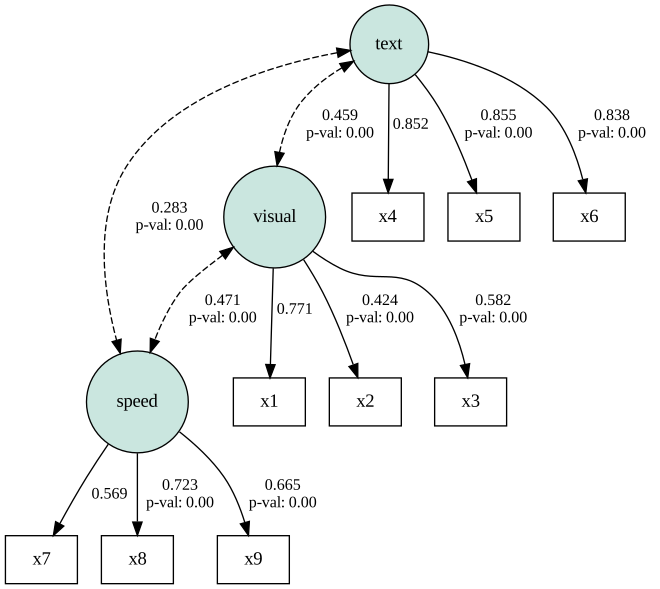
Rows such as visual ~~ text, visual ~~ speed, and text ~~ speed represent covariances between latent variables, reflecting how strongly the constructs are associated with each other. The positive and statistically significant covariances indicate that the latent abilities are positively related under the specified model.
In the unstandardised solution, these are raw covariances.
In the standardised solution, these values correspond to latent correlations.
Residual Variances of Observed Variables#
The final nine rows correspond to the residual variances of the observed variables. The standardised column shows the standardised residual variance, that is, the proportion of variance in the observed variable that is not explained by the latent factor.
For example, a standardised residual variance of 0.40 means that 40% of the variance in the observed variable remains unexplained, while 60% is explained by the latent factor.
In practice, residual variances are almost always greater than zero, because latent variables rarely account for all variability in observed measures. Their presence reflects measurement error and construct-irrelevant variance.
Learning break
How can you calculate the z-value yourself?
When should you read a
variable ~~ variableoutput as variance? When instead as residual variance?
Click to show solution
The z-value is computed as the Estimate divided by the SE.
Whether
variable ~~ variableis interpreted as variance or residual variance depends on whether the variable is predicted in the model:If the variable is exogenous (no incoming regression paths) it is the variance
If the variable is endogenous (it has predictors), it is the residual variance
Fit measures#
To assess model fit, semopy provides us with a wide range of fit measures:
stats = semopy.calc_stats(model)
print(stats.T)
                      Value
DoF            2.400000e+01
DoF Baseline   3.600000e+01
chi2           8.530573e+01
chi2 p-value   8.501896e-09
chi2 Baseline  9.188516e+02
CFI            9.305594e-01
GFI            9.071605e-01
AGFI           8.607407e-01
NFI            9.071605e-01
TLI            8.958391e-01
RMSEA          9.227505e-02
AIC            4.143318e+01
BIC            1.192825e+02
LogLik         2.834077e-01
χ² test (
chi2,chi2 p-value)
The chi-square test evaluates the null hypothesis that the model-implied covariance matrix equals the observed covariance matrix. A significant p-value indicates that the model does not reproduce the observed covariances exactly. However, the χ² test is highly sensitive to sample size, and significant results are common even for reasonably fitting models.CFI (Comparative Fit Index)
CFI compares the specified model to a baseline model that assumes no relationships among variables. Values closer to 1 indicate better fit. A CFI of 0.93 suggests an acceptable to good fit.TLI (Tucker–Lewis Index)
TLI is similar to CFI but penalises model complexity. Values closer to 1 indicate better relative fit. A TLI of 0.90 is often considered acceptable, though values above 0.95 are sometimes recommended.RMSEA (Root Mean Square Error of Approximation)
RMSEA summarises the degree of model misfit per degree of freedom, adjusting for model complexity. Values below 0.08 are often interpreted as acceptable, and values below 0.05 as good. An RMSEA of 0.09 indicates a mediocre fit.Log-likelihood (
LogLik)
The log-likelihood reflects how likely the observed data are under the specified model and is used to compute information criteria.AIC and BIC
The Akaike Information Criterion (AIC) and Bayesian Information Criterion (BIC) balance model fit and complexity. Lower values indicate a better trade-off between goodness of fit and parsimony. These measures are useful only for comparing models, not as absolute indicators of fit.
Visualizing the Model#
For visualization, we can plot our model specified model using the following code.
semopy.semplot(model, plot_covs = True, std_ests=True, filename='data/cfa_plot.pdf')
Comparing Models#
Next to evaluating our main model using model fit measures, we can also compare it to another model. In the initial model, the latent factors are assumend to covary. However, a model, in which the latent factors are set to be independent might provide a better fit. To specify such a model we need to set the covariances between the factors to be zero.
desc2 = '''visual =~ x1 + x2 + x3
           text =~ x4 + x5 + x6
           speed =~ x7 + x8 + x9

           # Set covariance to zero
           speed ~~ 0 * visual
           speed ~~ 0 * text
           text ~~ 0 * visual'''

# Fit the model
model2 = semopy.Model(desc2)
results2 = model2.fit(data)

# Print results
estimates2 = model2.inspect(std_est=True)
print(estimates2)
      lval  op    rval  Estimate  Est. Std  Std. Err    z-value   p-value
0       x1   ~  visual  1.000000  0.621242         -          -         -
1       x2   ~  visual  0.777690  0.479052  0.140577   5.532121       0.0
2       x3   ~  visual  1.106134  0.709327  0.213713   5.175797       0.0
3       x4   ~    text  1.000000  0.846971         -          -         -
4       x5   ~    text  1.132942  0.865571  0.067026  16.903003       0.0
5       x6   ~    text  0.924249  0.831695  0.056397  16.388161       0.0
6       x7   ~   speed  1.000000  0.607451         -          -         -
7       x8   ~   speed  1.225004  0.800752  0.189741    6.45619       0.0
8       x9   ~   speed  0.854879  0.560621  0.121394   7.042191       0.0
9    speed  ~~  visual  0.000000  0.000000         -          -         -
10   speed  ~~    text  0.000000  0.000000         -          -         -
11   speed  ~~   speed  0.436378  1.000000  0.096596   4.517579  0.000006
12    text  ~~  visual  0.000000  0.000000         -          -         -
13    text  ~~    text  0.968662  1.000000   0.11212   8.639478       0.0
14  visual  ~~  visual  0.524296  1.000000  0.130307   4.023553  0.000057
15      x1  ~~      x1  0.834191  0.614059  0.118174   7.059036       0.0
16      x2  ~~      x2  1.064637  0.770509  0.104633  10.174933       0.0
17      x3  ~~      x3  0.633474  0.496855  0.129037   4.909248  0.000001
18      x4  ~~      x4  0.381652  0.282639  0.048902   7.804458       0.0
19      x5  ~~      x5  0.416184  0.250786  0.059129   7.038589       0.0
20      x6  ~~      x6  0.368783  0.308283  0.044073   8.367492       0.0
21      x7  ~~      x7  0.746228  0.631003  0.086244   8.652507       0.0
22      x8  ~~      x8  0.366430  0.358797  0.096487     3.7977  0.000146
23      x9  ~~      x9  0.695777  0.685704  0.072202   9.636564       0.0
# Print fit statistics
stats2 = semopy.calc_stats(model2)
print(stats2.T)
                    Value
DoF             27.000000
DoF Baseline    36.000000
chi2           153.527262
chi2 p-value     0.000000
chi2 Baseline  918.851637
CFI              0.856683
GFI              0.832914
AGFI             0.777219
NFI              0.832914
TLI              0.808911
RMSEA            0.124983
AIC             34.979885
BIC            101.707870
LogLik           0.510057
# Visualise the model
semopy.semplot(model2, std_ests=True, filename='data/cfa_plot2.pdf')
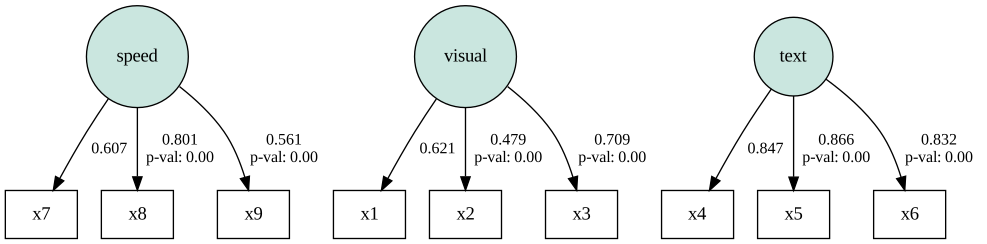
We can see that the covariances between the latent factors (e.g. speed ~~ visual) are now forced to be zero.
print("Model1:")
print(stats.T)  # Model 1 (correlated latent factors)
print("\nModel2:")
print(stats2.T) # Model 2 (independent latent factors)
Model1:
                      Value
DoF            2.400000e+01
DoF Baseline   3.600000e+01
chi2           8.530573e+01
chi2 p-value   8.501896e-09
chi2 Baseline  9.188516e+02
CFI            9.305594e-01
GFI            9.071605e-01
AGFI           8.607407e-01
NFI            9.071605e-01
TLI            8.958391e-01
RMSEA          9.227505e-02
AIC            4.143318e+01
BIC            1.192825e+02
LogLik         2.834077e-01

Model2:
                    Value
DoF             27.000000
DoF Baseline    36.000000
chi2           153.527262
chi2 p-value     0.000000
chi2 Baseline  918.851637
CFI              0.856683
GFI              0.832914
AGFI             0.777219
NFI              0.832914
TLI              0.808911
RMSEA            0.124983
AIC             34.979885
BIC            101.707870
LogLik           0.510057
By comparing AIC and BIC values across models, we can assess which model provides a more parsimonious description of the data. Lower AIC and BIC values favour the simpler independence model. However, statistical fit must always be interpreted in light of theoretical considerations: a model with better information criteria is not necessarily the most meaningful from a substantive perspective.